框住螢幕任何一塊,變了就通知你。
不管那塊畫面屬於哪個程式 —— Citrix、SAP、公司 2005 年寫的內部系統、瀏覽器後台、算圖進度 —— 它只看畫素,不需要跟任何程式整合。
Watch any region of your screen and get notified when it changes. Works with any application, because it only looks at pixels.
目前所有功能免費開放,沒有使用期限,也沒有廣告或追蹤。
查看所有版本
Watch any region of your screen. Get notified when it changes.
It doesn't matter which program that patch of screen belongs to — Citrix, SAP, the internal system your company wrote in 2005, a browser dashboard, a render progress bar. It only looks at pixels, so it needs no integration with anything.
框住螢幕任何一塊,變了就通知你。
Every feature is free right now, with no time limit, no ads and no tracking.
All releases
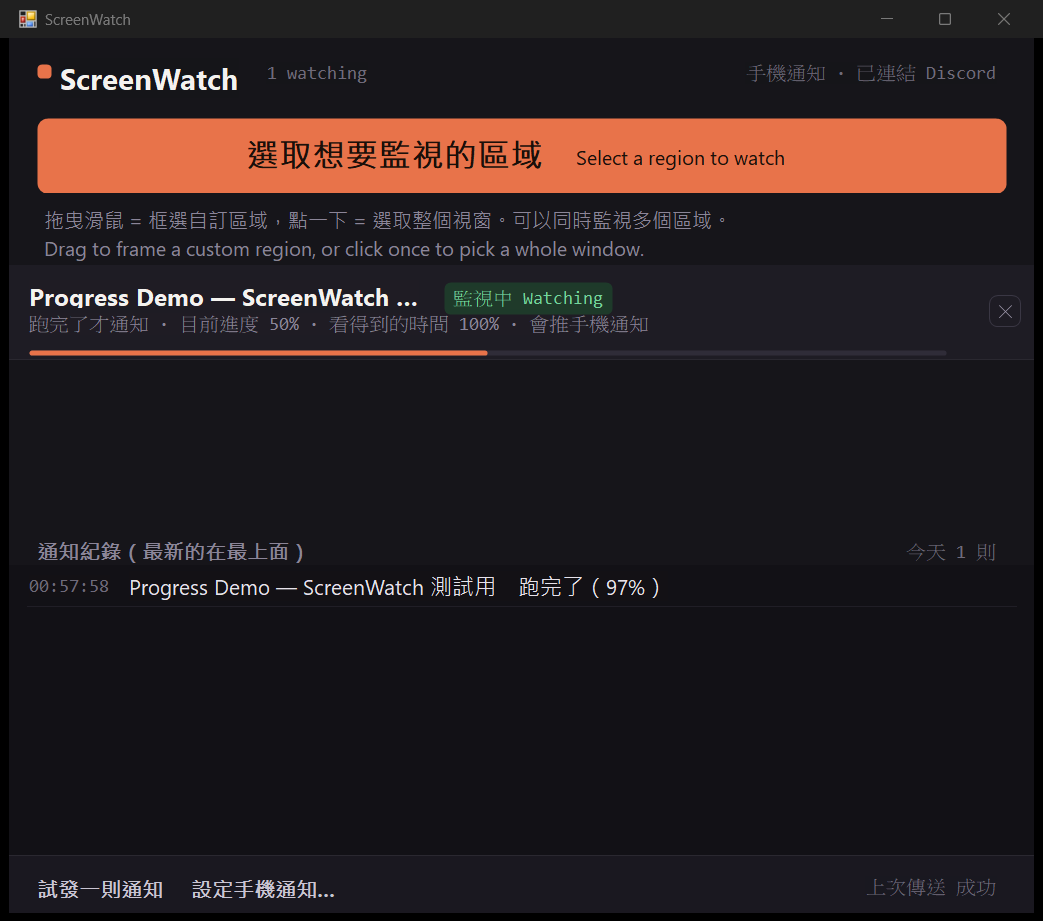
主視窗:監視清單顯示目標名稱、狀態、通知條件與進度,下方是通知紀錄
Main window: the watch list shows target name, status, trigger condition and progress, with the notification log below
它能做什麼
四種通知條件
畫面有變化就通知、進度條跑完才通知、跑到指定 % 通知、顏色變了通知。後三種是邊緣觸發,跑完只響一次,不會一直吵。
自己找出進度條
直接框整個視窗就好,程式會在範圍內找出那條進度條。就算它跑滿之後立刻歸零重跑,也抓得到。
推播到手機
接上 Discord webhook,電腦在跑東西時人可以先去吃飯,跑完手機會響。
最小化也繼續看
最小化的視窗不會繪製,所以程式會把它移到背景繼續監視,而不是叫你別按最小化。
不會靜默失效
抓不到畫面時會明講原因,那段時間也會從「看得到的時間」扣掉。通知紀錄讓你分辨是條件沒成立,還是 Windows 擋掉了通知。
很輕
單一執行檔,不到 100 KB,沒有背景服務、沒有安裝時的相依套件。
下載時 Windows 會跳警告,這是正常的
這個版本還沒有購買程式碼簽章憑證,所以 Microsoft Defender SmartScreen 會顯示「Windows 已保護您的電腦」。這代表「這個檔案還沒有累積足夠的下載信譽」,不代表它被判定為惡意程式。
- 1點「其他資訊」
- 2再點「仍要執行」
不放心的話,可以先把安裝檔上傳到 VirusTotal 用七十幾種防毒引擎掃描再決定。
What it does
Four trigger conditions
Notify on any change, notify only once a progress bar finishes, notify at a chosen %, notify when a color changes. The last three are edge-triggered: they fire once and then stop nagging.
Finds the progress bar itself
Just frame the whole window and it locates the progress bar inside your selection — even one that drops back to zero and restarts the moment it fills.
Push to your phone
Connect a Discord webhook and go eat while the machine works. Your phone rings when it's done.
Keeps watching when minimized
A minimized window isn't drawn, so ScreenWatch moves it into the background and keeps watching, instead of telling you not to minimize things.
No silent failure
When it can't read the screen it says why, and that stretch is deducted from the time it could actually see. The notification log tells you whether the condition never met or Windows blocked the notification.
Very light
A single executable under 100 KB, with no background service and no dependencies to install.
Windows warns you on download. That's expected.
This build doesn't have a code signing certificate yet, so Microsoft Defender SmartScreen shows "Windows protected your PC". That means the file hasn't built up enough download reputation — not that it was judged to be malware.
- 1Click "More info"
- 2Then click "Run anyway"
If you'd rather check first, upload the installer to VirusTotal and scan it with seventy-odd antivirus engines.
你應該知道的事
它會移動你的視窗
被監視的視窗一旦最小化,程式會把它還原並移到螢幕可見範圍之外,以便繼續擷取畫面。可以隨時從系統匣選單放回來,關閉程式時也會自動還原。
「跑完了」是推論
Windows 的進度條填滿時帶有動畫,若程式完成後立即重設,畫面上可能從未出現完整填滿的狀態。這時會依「進度大幅倒退」推論已完成,可能把失敗重試誤判為跑完。
不要用在關鍵用途
這是便利工具,不是監控或警報系統。醫療、工安、消防、交通、自動交易等「沒收到通知就可能出事」的場景請不要使用。
手機推播會把資料送到 Discord
啟用後,視窗標題與觸發原因會傳到你指定的 Discord 頻道。附上截圖的選項預設關閉。在公司環境使用前請自行確認合規。
有些畫面抓不到
全螢幕遊戲、有版權保護的影片視窗不允許其他程式讀取畫面。這種情況清單上會顯示「看不到畫面」並說明原因。
完整條款請見安裝時顯示的 使用條款與免責聲明。
What you should know
It moves your windows
Once a watched window is minimized, ScreenWatch restores it and moves it outside the visible screen area so it can keep capturing. You can bring it back any time from the tray menu, and it is restored automatically when the program closes.
"Finished" is an inference
Windows progress bars animate as they fill, so if a program resets immediately after completing, a fully filled state may never appear on screen. ScreenWatch then infers completion from a large backward jump in progress, which can mistake a failed retry for a finish.
Don't use it for critical purposes
This is a convenience tool, not a monitoring or alarm system. Don't use it for medical, industrial safety, fire, traffic, automated trading or any other situation where a missed notification could cause harm.
Phone push sends data to Discord
Once enabled, the window title and the trigger reason are sent to the Discord channel you specify. Attaching a screenshot is off by default. Confirm compliance yourself before using it on a company network.
Some screens can't be captured
Full-screen games and DRM-protected video windows don't let other programs read their pixels. In that case the list shows that the screen isn't visible, and explains why.
Full terms are shown during installation: Terms of Use and Disclaimer.
系統需求
%LOCALAPPDATA%\Programs\ScreenWatch,不需要管理員權限
%LOCALAPPDATA%\ScreenWatch\config.txt,解除安裝時一併刪除
Requirements
%LOCALAPPDATA%\Programs\ScreenWatch, no administrator rights required
%LOCALAPPDATA%\ScreenWatch\config.txt, deleted when you uninstall